

Open your library with Face ID or your local App Code.

Available on the App Store
How to choose a private photo vault for iPhone
Look beyond a lock screen. A useful vault should explain encryption, export, backup, recovery and what happens if you stop paying.
Encrypted Library & BackupsNo account, advertising, analytics or behavioural tracking.
No vague promises
A clearer way to decide
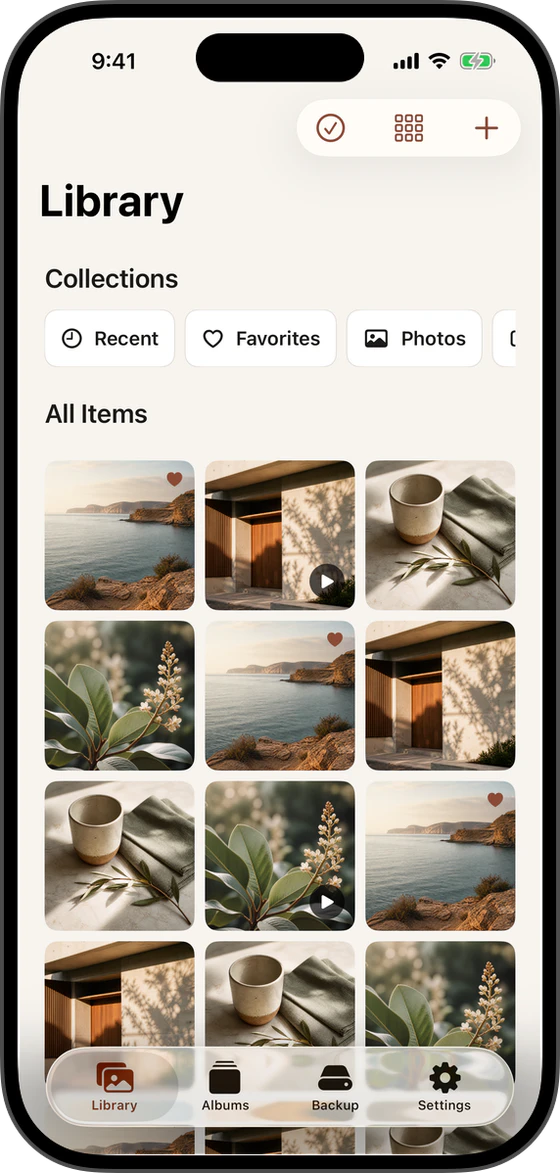
Photress is a private, encrypted photo and video library designed to keep your files under your control. Your media stays on your iPhone and in backup locations you choose. No Photress account is required.
Use these steps as a decision framework rather than a promise that one storage choice removes every risk.
Import photos and videos from Photos or Files.
Browse your photos, play videos, and organise with albums, favourites, and smart collections. Pro also adds nested folders and additional independent backup destinations.
Original photo and video resources, thumbnails, library metadata, and local indexes are encrypted at rest.
Every media resource gets its own random 256-bit key. AES-256-GCM encrypts and authenticates the data, so altered or corrupted encrypted content is rejected.
What matters here
Details that should not stay hidden
Look beyond a lock screen. A useful vault should explain encryption, export, backup, recovery and what happens if you stop paying.
Good privacy software should make the state understandable before asking you to trust it.
Metadata uses a separately keyed SQLCipher database. Backup Passphrases use Argon2id, while the local App Code is deliberately excluded from portable-backup encryption.
View and export everything you have added, even without an active subscription.
Encrypted Library & Backups
What Photress promises — and what it does not
Photress reports only the evidence it has. It does not turn a local write into a cloud-upload claim or a successful integrity check into a completed restore test.
Restore, create an emergency backup, resolve backup conflicts, and delete your existing data without renewing Pro.
Before you continue
Keep at least one portable backup credential outside the iPhone, retain access to the chosen destination and verify important copies periodically.